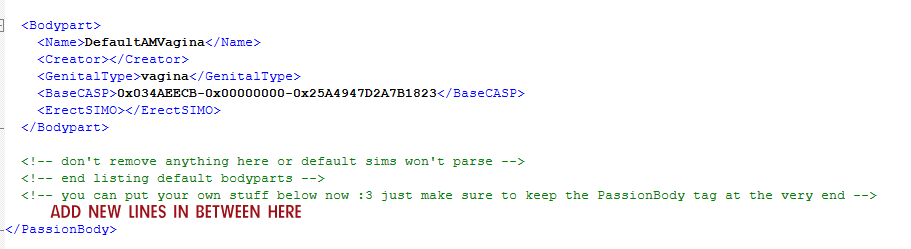
There are two tunable files for body parts, each located in different .package files.
BORDEROFEXTACY_Bodies contains the master XML for body part registration, while BORDEROFEXTACY_Settings contains the fallback CAS parts.
Modifying Fallbacks
The fallback is what a sim's penis will 'fall back' to in the case where a male sim's nude bottom is not recognized. It's resource name is S3_Passion.BOE_Tunables.PassionBody
If you'd like to replace these fallbacks, open the package containing the erect penis CAS Part (CASP) you'd like to use. Find the CASP resource, and copy it's resource key. Then, paste that key into the XML file.
Registering Custom Genitalia
The bottom model / CAS part a sim has is processed based on what their bottom is on the sim's nude outfit in CAS. The mod checks to see what bottom they have set while nude, logs what type it is, and switches to its 'companion' CAS part (for parts of types 'penis' and 'both').
This information is stored in an XML file located in BORDEROFEXTACY_Bodies.package, and can be edited with Sims 3 Package Editor (S3PE) to add new entries!
The structure is as follows...
  <Bodypart>
   <Name></Name>
	<Creator></Creator>
	<GenitalType></GenitalType>
	<BaseCASP></BaseCASP>
	<ErectSIMO></ErectSIMO>
  </Bodypart>
Each bodypart must be contained within the pair of Bodypart tags.
Name is for personal reference or debugging use. Can be left blank.
Creator is for personal reference or debugging use. Can be left blank.
GenitalType refers to the 'type' of genitals the bodypart is. Valid values, must be all lowercase: penis, vagina, both, neither
BaseCASP refers to the CASP id of the 'base' part; this is the part the sim has as their nude bottom in CAS. To get this ID, open the .package that contains the bottom, and find its CASP resource. Right-click it, and select 'copy resource key'. Paste this, as is, between the BaseCASP tags.
ErectSIMO only applies for parts of the 'penis' or 'both' type. This is the part that a sim will swap into when erect. To get this ID, open the .package that contains the erect bottom, and find its CASP resource. Right-click it, and select 'copy resource key'. Paste this, as is, between the ErectSIMO tags. Remember to use a CASP instead of a SIMO - the naming here is from a legacy version.
You may copy the base structure as many times as you want, just be sure to keep the PassionBody closing tag intact.