An interactive terminal application for streaming and downloading anime from various streaming sourc
https://github.com/upi-0/wewbo
| .github | ||
| asset | ||
| src | ||
| tests | ||
| .gitignore | ||
| config.nims | ||
| install.sh | ||
| LICENSE | ||
| README.md | ||
| wewbo.nimble | ||

wewbo
An interactive terminal application for searching and watching anime from various streaming sources. Install Here
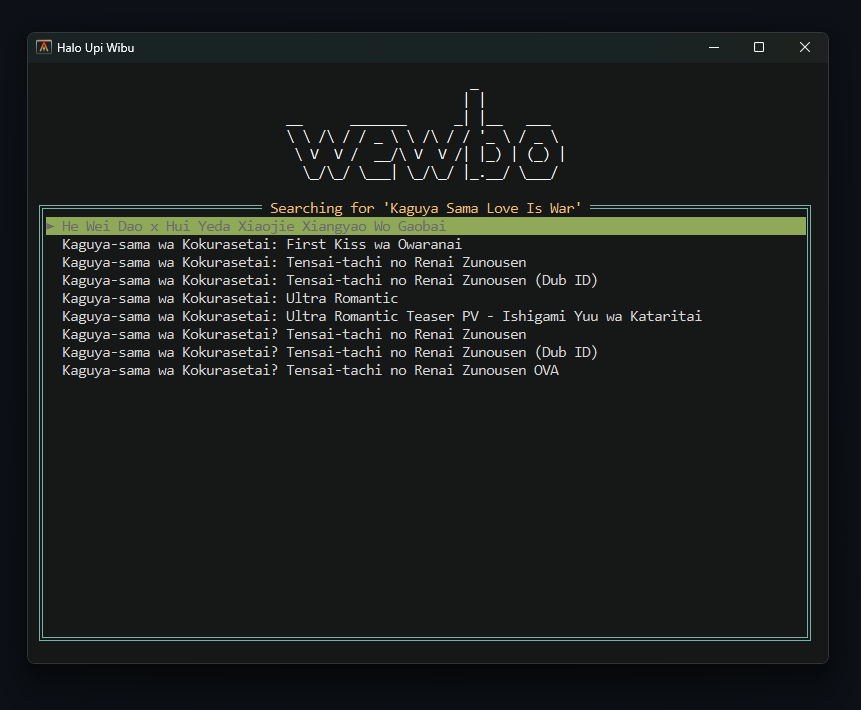
About
Wewbo is a command-line-based application that allows you to search for anime, select episodes, and watch them instantly using your favorite media player (MPV or FFplay). The application supports multiple anime sources with an easy-to-use interface.
Sources Status
| Name | Web | Status | Issue |
|---|---|---|---|
| Hime | https://hianime.to | ❌ | End of Service |
| Kura | https://v8.kuramanime.tel | ❌ | Cryptography |
| Pahe | https://animepahe.to | ✅ | - |
| Taku | https://otakudesu.best | ✅ | - |
How to Use
Streaming
wewbo [anime title]
wewbo stream [anime title]
Downloading
wewbo dl [anime title]
Usage Examples
# Search and watch anime from animepahe (default)
wewbo "slow loop"

# Search for anime from otakudesu
wewbo "slow loop:taku"

# Search for anime using FFplay as player
wewbo "attack on titan" -p:ffplay

# Search for anime from otakudesu using external MPV as player
wewbo "demon slayer:taku" --mpv:/path/to/mpv
Install
Make sure mpv & ffmpeg are available in your $PATH. Learn how
Windows
Scoop
# Install Scoop
Set-ExecutionPolicy -ExecutionPolicy RemoteSigned -Scope CurrentUser
Invoke-RestMethod -Uri https://get.scoop.sh | Invoke-Expression

# Install wewbo & mpv
scoop bucket add extras
scoop install mpv https://github.com/upi-0/wewbo/releases/latest/download/wewbo.json

# Install ffmpeg (recommended)
scoop install ffmpeg
Linux
Curl
curl -fsSL "https://raw.githubusercontent.com/upi-0/wewbo/refs/heads/main/install.sh" | bash
AUR
yay -S wewbo
paru -S wewbo
Nim
Git Clone
git clone https://github.com/upi-0/wewbo; cd wewbo
nimble build -y
Install directly
nimble install wewbo
Roadmap
- HTTP Cache (v0.7)
- Batch Downloader (v0.8)
- Concurrently Searching (v0.9)
- Cleaned TUI (v0.9.5)
- Fix all known bugs (v1)
- Soft Sub translator (v1.1)
- Load external extractor lib (v1.2)
For Developers
Technologies Used
- q: parsing HTML using CSS selector
- htmlparser: parsing HTML
- illwill: TUI design
- malebolgia: multiprocessing