- Python 100%
| Filename | Latest commit message | Latest commit date |
|---|---|---|
| .forgejo/ISSUE_TEMPLATE | ||
| exporting | ||
| extras | ||
| importing | ||
| interface | ||
| wiki | ||
| .gitignore | ||
| __init__.py | ||
| blender_manifest.toml | ||
| Changelog.md | ||
| common.py | ||
| create_release.py | ||
| KK Shader V9.blend | ||
| KKPanel.py | ||
| LICENSE.md | ||
| preferences.py | ||
| README.md | ||

KKBP Importer

This is a plugin pack for exporting Koikatsu cards to Blender.
The KKBP Exporter exports the card's textures, mesh and armature from the game. The KKBP Importer uses that data to setup the character in Blender.
Imported characters can be used in Blender for animations, renders, etc. They can also be converted to FBX files to use in other programs.
- Download
- Alternate download (this is a live snapshot of the development version that might not work!)
Supported games
| Game | Feature support |
|---|---|
| Koikatsu | Full support |
| Koikatsu Party | Full support |
| Koikatsu Sunshine | Full support |
| Summer Vacation Scramble | Partial support |
| Aicomi | Partial support |
Features
- Near perfect mesh and texture replication
- All face / tear / cartoon eye expressions available as shape keys
- Can import animations and poses from the game
- Works in EEVEE and Cycles
- Fully featured Rigify armature
- Export the model as .fbx for Unity VRM or Unreal Engine
- Easily edit colors for most materials, just like in the game!
- SFW mode
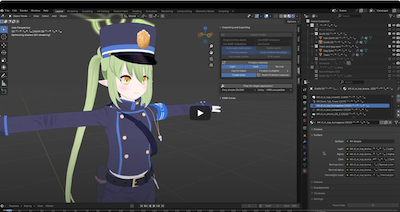
Video walkthrough of the plugins
How to use it
Export the card from Koikatsu
click here to show export instructions
-
Install the dependencies
- The easiest way to mod your game and install all dependencies is the HF Patch for Koikatsu or the HF Patch for Koikatsu Sunshine
- If you are already using the pre-modded Better Repack, you need to do one of the following:
- manually install the "Character Maker Poses" zipmod
- OR, update your mods using the auto-updater in the launcher
- OR, install the HF patch over the repack
- If your game is already modded, but you don't want to install the HF patch, just install KKAPI, KK Accessory States, KK Pushup, and the poses zipmod linked above
-
Find your Koikatsu install directory and drag the KKBP exporter .dll into the /bepinex/plugins/ folder
-
Start Koikatsu and open the Character Maker
-
Enable the KKBP Exporter window.

-
Click the "Export Model for KKBP" button at the top of the screen.
- This may take a few minutes depending on your computer hardware.
- An explanation of all export options can be found here
-
A folder in your Koikatsu install directory will popup when the export is finished
Export the card from Summer Vacation Scramble or Aicomi
click here to show export instructions
-
Install the dependencies
The easiest way to mod your game and install all dependencies is the HF Patch -
Export your SVS or AC model using one of the following plugins by Sonogami_Rinne:
-
Import the pmx file to blender using KKBP 9.3.0 or higher. The import instructions are in the next section.
Import the model to Blender
click here to show import instructions
-
Open Blender 5.2. Other versions are not guaranteed to work. Click here if you are not using Blender 5.2
-
Install mmd_tools in Blender
-
Install KKBP Importer in Blender
-
After you install both addons, you can click the "Import model" button in the KKBP panel.
-
Choose the .pmx file from the export folder

-
The blender console will appear and begin importing the model. This may take a few minutes depending on your computer hardware

-
Check there were no errors during import in the scripting tab. A successful import will end in "KKBP import finished in XX minutes"


(Optional) Exporting as fbx
click here to show fbx export instructions
-
If you want to reduce the bone count, or convert the model's armature for VRM / VRChat / Unreal Engine, click the "Prep for target application" button in the KKBP panel. This will also create an atlas file for your body / hair / clothes and save them to the atlas_files folder in your export folder
-
After you click the button, hide the original collection in the outliner and show the new collection

-
Click the export button in the collection tab to export an fbx file to the atlas_files folder in the export folder

(Optional) Bulk exporting and the Python API
click here to show bulk operation info
Bulk exporting
The KKBP exporter allows you to bulk export a folder of cards. In the export panel, enable the bulk export option, click the export button and choose the folder you want to bulk export. Only the cards in the folder you select will export. No subfolders will be exported. They will be stored in the /Koikatsu/Export_PMX/ folder. This feature works about 80% of the time. If one of your cards has an issue the bulk export, you can try exporting the card again manually and it should work.
The KKBP importer also supports bulk importing. In blender, expand the KKBP Extras section of the panel and click the bulk import button. Choose the folder that contains all your bulk exports, so for example the Export_PMX folder. Blender will begin importing each character in the Export_PMX folder and save a .blend file after it's done processing each character.
Python API
You can use Blender's built in bpy library to automatically import a model without manually clicking through the KKBP panel.
import bpy
pmx_folder = r'C:\Koikatsu\Export_PMX\20260119173812_SamekoSaba'
bpy.context.scene.kkbp.import_dir = pmx_folder
bpy.ops.kkbp.kkbpimport('EXEC_DEFAULT')
You can also automatically set up the import options and export the model as an fbx file; no clicking required!
import bpy, os

#Set panel preferences
panel = bpy.context.scene.kkbp
panel.shader_dropdown   = 'A' #A: Eevee, B:Cycles Toon, D: Cycles Classic, C: Eevee Mod, E: Principled
panel.use_rigify        = False #Must be false if you are using the export features
panel.sfw_mode          = False
panel.fix_seams         = True
panel.use_outline       = True
panel.separate_clothes  = False

#import the model
pmx_folder = r'C:\Koikatsu\Export_PMX\1234567890_MyCard'
bpy.context.scene.kkbp.import_dir = pmx_folder
bpy.ops.kkbp.kkbpimport('EXEC_DEFAULT')

#Run export prep on the model
panel.prep_dropdown     = 'VRM' #'VRM', 'VRC', 'Unreal', 'Koikatsu', 'no_change'
panel.simp_dropdown     = 'A' #A: Very Simple, B: Simple, C: No changes
panel.atlas_dropdown    = 'Atlas' #'Atlas', 'skip_eyes', 'None'
bpy.ops.kkbp.exportprep('EXEC_DEFAULT')

def get_layer_collection_from_name(base_collection: bpy.types.LayerCollection,
                                   search_term: str) -> bpy.types.LayerCollection:
    '''Returns the view layer collection object by name'''
    # check if this is it
    if (base_collection.name == search_term):
        return base_collection
    # If not, recursively go through the collection's children for the search term
    for child in base_collection.children:
        if child.name == search_term:
            return child
        else:
            recursive_result = get_layer_collection_from_name(child, search_term)
            if recursive_result:
                return recursive_result
def show_layer_collection(collection_name: str, state: bool):
    '''Sets the exclude state of a view layer collection'''
    base_collection = bpy.context.view_layer.layer_collection
    collection = get_layer_collection_from_name(base_collection, collection_name)
    collection.exclude = state
def get_name():
    return bpy.context.scene.kkbp.character_name

#hide the original collection
show_layer_collection('Rigged tongue ' + get_name(), True)
show_layer_collection(get_name(), True)

#show the new collection
show_layer_collection('Rigged tongue ' + get_name() + '.001', False)
show_layer_collection(get_name() + ' atlas', False)

#make the new collection active
layer_collection = bpy.context.view_layer.layer_collection.children[get_name() + ' atlas']
bpy.context.view_layer.active_layer_collection = layer_collection

#Click the export collection button
bpy.ops.collection.export_all()

#Save the blend file to the pmx folder
save_path = os.path.join(pmx_folder, 'imported_to_blender.blend')
bpy.ops.wm.save_as_mainfile(filepath=save_path)

#quit blender
bpy.ops.wm.quit_blender()
Help
Check the wiki for FAQ and basic info.
I also setup a Discord for general discussion / help
If you're still having trouble please create a new issue
Contributing
Any contributions are welcome! Please check out the links below:
Community Port Guides
- KKVRM - Port KKBP models to VRM
- Kokatsu Port Tools - Port KKBP models to GMOD
- KKBP Rigify Conversion Guide - Convert KKBP's Rigify armatures to Godot (and Unity) compatible rigs
Similar Projects
- KKBP Exporter - The exporter plugin for this project
- SVS CharacterExporter - Character exporter for Summer Vacation Scramble
- AC Exporter - Character exporter for Aicomi
- SKLX Studio lite - Export Koikatsu cards to Blender
- KKPMX - Export Koikatsu cards to MMD
- Koikatsu Pmx Exporter (Reverse Engineered & updated) - The original Koikatsu mesh exporter decompiled and updated
- KKBridge - Export Timeline animations to VMD format